The one where Cucumber meets Scala with SBT
In the following post I will show how to configure a new project in order to write integration tests with Cucumber, Scala and SBT build tool.
Target audience: QA Automation engineers / developers
DISCLAIMER: Any Selenium WebDriver usage will not be found in post as it is out of scope.
It is assumed that reader has some experience with Behavior Driven Development approach and a Cucumber test tool.
For information please refer to official Cucumber website.
Also I can highly recommend you two great books about Cucumber:
As we are trying to write BDD tests on Scala, Scala and SBT tool should be installed. For installation please refer to: Scala and SBT installation guides.
For our needs we should install:
Just follow the File -> New -> Project -> Scala -> SBT - based project. Wait for some minutes while project is created. In result project will be with the following structure:
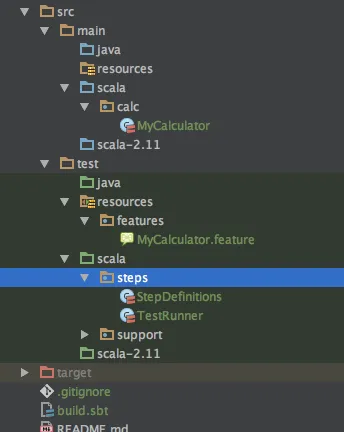
Add to build.sbt the following dependencies:
libraryDependencies += "info.cukes" % "cucumber-scala_2.11" % "1.2.4" libraryDependencies += "info.cukes" % "cucumber-junit" % "1.2.4" libraryDependencies += "junit" % "junit" % "4.12" }NOTE: If IDEA does not pop-up with suggestion to refresh dependencies - open SBT tab on the right panel and click refresh button.
Now just wait for dependencies resolving and download.
I have written a simplest MyCalculator scala class and put it into src/main/scala/calc package
package calc class MyCalculator { def add(first: Int, second: Int): Int = { first + second } def sub(first: Int, second: Int): Int = { first - second } }For our simple caluclator example we will use two simple positive scenarios: one for checking addition and the other is for checking subtraction.
Here it is the full feature written in Gherkin language.
Feature: My Calculator @wip Scenario: Should add two positive numbers Given my calculator is running When I add 1 and 2 Then result should be equal to 3 @wip Scenario: Should subtract two positive numbers Given my calculator is running When I subtract 3 and 1 Then result should be equal to 2Put feature file in the src/test/resources/features folder.
Now it is time to implement our step definitions. For that you should create a StepDefinitions.scala class in src/test/scala/steps package.
If it is hard to implement steps from scratch, just go to feature file, right click on the feature name and choose “Run Feature: My Calculator” option.
It will run all scenarios from your feature.
As none of the steps are implemented - the test result output will contain boilerplate code for steps, generated by Cucumber.
For curreny example it will be:
 Given("""^my calculator is running$"""){ () =>  //// Write code here that turns the phrase above into concrete actions
  throw new PendingException() } When("""^I add (\d+) and (\d+)$"""){ (arg0:Int, arg1:Int) =>  //// Write code here that turns the phrase above into concrete actions
  throw new PendingException() } Then("""^result should be equal to (\d+)$"""){ (arg0:Int) =>  //// Write code here that turns the phrase above into concrete actions
  throw new PendingException() }
Just Copy/Paste it in StepDefinitions class. Delete all PendingException() code and redundant comments.
For the testing purposes we will share one instance of Calculator between the steps.
In order to achive that just add calculator as class member in StepDefinitions class.
All implementation of the steps will be:
package steps import calculator.MyCalculator import cucumber.api.scala.{EN, ScalaDsl} class StepDefinitions extends ScalaDsl with EN { var calc: MyCalculator = _ var result: Int = _ Given("""^my calculator is running$"""){ () => calc = new MyCalculator } When("""^I add (\d+) and (\d+)$"""){ (firstNum:Int, secondNum:Int) => result = calc.add(firstNum, secondNum) } Then("""^result should be equal to (\d+)$"""){ (expectedResult:Int) => assert(result == expectedResult, "Incorrect result of calculator computation") } When("""^I subtract (\d+) and (\d+)$"""){ (firstNum:Int, secondNum:Int) => result = calc.sub(firstNum, secondNum) } }In order to run test scenarios a separate test runner class with custom cucumber options should be created.
Place it into src/test/steps TestRunner scala class.
package steps import cucumber.api.CucumberOptions import cucumber.api.junit.Cucumber import org.junit.runner.RunWith @RunWith(classOf[Cucumber]) @CucumberOptions( features = Array("classpath:features"), glue = Array("classpath:steps"), tags = Array("@wip"), monochrome = true, plugin = Array("pretty", "html:target/cucumber", "json:target/cucumber/test-report.json", "junit:target/cucumber/test-report.xml") ) class TestRunner {}NOTE: plugin option allows you to set runner to produce test output in the various formats, such as html, json and xml. Description of other Cucumber runner options can be found here
Right click on TestRunner class name and choose Run TestRunner.
See test results output after a while.
Feature: My Calculator @wip Scenario: Should add two positive numbers Given my calculator is running When I add 1 and 2 Then result should be equal to 3 @wip Scenario: Should subtract two positive numbers Given my calculator is running When I subtract 3 and 1 Then result should be equal to 2 2 Scenarios (2 passed) 6 Steps (6 passed) 0m0.196s